To activate your newly purchased AVG, please follow the steps below.
1. Open your installed AVG using the desktop icon.
2. Go to Menu at the top right and the click on Enter activation code.
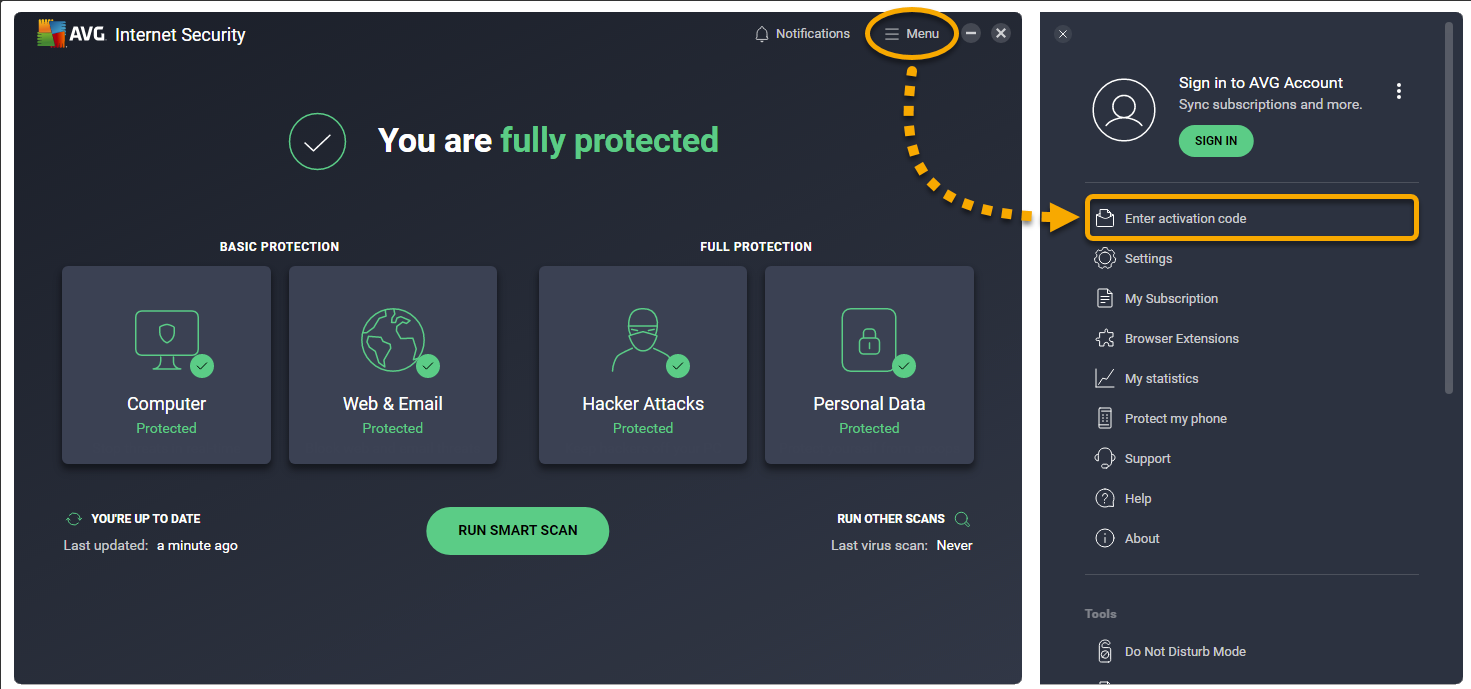
3. Type of paste in your activation code and click Enter.
Disable AVG Advertising Pop-Ups
We recommend turning off promotional pop-ups where AVG advertises additional products.
To disable these notifications:
1. Open AVG from your desktop.
2. Click Menu (top right) → Settings.
3. Select General from the left panel.
Disable promotional offers:
4. Scroll to Privacy Preferences.
5. Under Personalized discounts, uncheck all boxes.
6. In the left menu under General, click Notifications.
7. Under the Offers section, uncheck all boxes.
Limit pop-ups after scans:
8. In General → Notifications, scroll to Pop-up notifications treatment.
9. Select Limited Mode.
This will significantly reduce promotional messages while keeping core security alerts active.
Office Works
Your Technical Team - On Your Side
Call or Text: 519.863.6336
Email: support@officeworks.ca
Website: www.OfficeWorks.ca
Was this article helpful?
That’s Great!
Thank you for your feedback
Sorry! We couldn't be helpful
Thank you for your feedback
Feedback sent
We appreciate your effort and will try to fix the article